Marketing automation that actually drives revenue
HubSpot Marketing Hub helps you attract the right visitors, convert them into qualified leads, and prove exactly which campaigns drive pipeline. All powered by AI. All connected to your CRM.
More tools. More channels. Less clarity on what's actually working.
Email in one platform. Social media in another. Ads somewhere else. Landing pages in a third system. CRM data that never quite syncs correctly.
Your team spends more time switching between tabs than running campaigns. And the complete picture of your customer? It's scattered across systems that don't talk to each other.
Building email lists manually. Copying contact data between platforms. Creating the same performance report every Monday morning. Formatting the same email template for the tenth time.
Your marketing team is stuck in execution mode - firefighting repetitive tasks instead of focusing on strategy that actually moves the needle.
You know marketing is working. You can feel it. But when the CEO asks which campaigns drove last quarter's pipeline, you're stitching together spreadsheets and making educated guesses.
Without clear attribution, marketing stays a cost center. It never becomes the revenue engine it should be.
The Disconnected Customer Journey
Low conversion rates and unclear ROI aren't just marketing problems - they are symptoms of the same root cause: treating the customer journey as a series of isolated events rather than a continuous conversation.
Marketing teams often assemble a "Franken-stack" of tools: one for email, one for social, another for landing pages, and a separate database for analytics. Each tool holds a fragment of the truth, but none shows the whole picture. Without a unified view, you cannot personalize at scale. You end up blasting generic messages to everyone because you don't know exactly who anyone is or what they need right now.
When data lives in silos, your marketing feels robotic, spammy, and disconnected to the buyer.

A prospect visits your pricing page three times and downloads a technical whitepaper. This is a clear buying signal. However, the email automation tool doesn't "know" about the website visits.
Instead of alerting Sales or sending a bottom-of-funnel case study, the system keeps the prospect in a generic "Welcome" drip campaign, sending them introductory blog posts they don't need.
Frustrated by the irrelevant content and lack of human outreach, the prospect assumes your company doesn't understand their sophisticated needs and unsubscribes.
You paid to acquire the lead, but you lost the customer because your tools couldn't connect the dots between their behavior and your outreach.
Your marketing team doesn't need more disconnected apps. They need one platform that unites your customer data and helps them focus on the campaigns that actually drive revenue.
HubSpot Marketing Hub: Marketing automation built for results
Marketing Hub isn't just another marketing tool. It's an AI-powered platform that connects every marketing activity to your CRM - so you can generate leads, nurture them automatically, and see exactly which campaigns drive revenue.
One platform. One source of truth. One clear line from marketing activity to closed deals.
What makes Marketing Hub different
AI-Powered Everything
Breeze AI is built into every part of Marketing Hub. Write emails faster. Generate social posts. Get content recommendations. Optimize send times automatically. It's like adding team members without adding headcount.
Connected to Your CRM
Every email open, form submission, page view, and ad click is tied to a contact record. Sales sees what marketing is doing. Marketing sees what's actually closing. No more "marketing qualified leads" that disappear into a black hole.
Automation That Scales
Build sophisticated nurture campaigns, lead scoring models, and cross-channel workflows with a visual editor. No coding required. No six-month implementation. Start simple, get complex as you grow.
ROI You Can Actually Prove
Multi-touch attribution shows exactly which campaigns, channels, and content pieces drive pipeline and revenue. Make budget decisions based on data - not gut feeling or whoever presents best.
What Marketing Hub does (and why it matters)
Turn visitors into leads worth talking to
Ad Tracking & Management
Connect your Facebook, Instagram, LinkedIn, and Google Ads accounts directly to HubSpot.
Instead of just measuring clicks, you can see exactly which ads generate contacts that eventually close as deals.
Use CRM data to target high-intent audiences and turn off ad spend for leads that have already converted.
- Unified ad management console
- ROI reporting based on actual deal revenue
- CRM-powered retargeting audiences
- Automated lead syncing from LinkedIn & Facebook
Lead Scoring
Build scoring models based on fit (company size, industry, job title) and engagement (email opens, page visits, content downloads). Surface leads that are actually likely to buy, not just the ones who download every piece of content you publish.
- Fit scoring based on demographic and firmographic data
- Engagement scoring based on behavior
- Predictive lead scoring powered by AI
- Score-based workflow triggers for automatic routing
- Score decay for leads that go cold
Calls-to-Action (CTAs)
Create embedded and pop-up CTAs that guide visitors toward conversion. Show different offers to different audiences - a demo CTA for high-intent visitors, a guide download for those still researching.
- Smart CTAs that personalize based on viewer data
- CTA performance analytics by placement and audience
- A/B testing to optimize conversion rates
Put your marketing on autopilot
Build automated workflows that nurture leads, segment audiences, and trigger actions across email, ads, and your website - all based on what contacts actually do.
Email Marketing
Design emails that look good on every device with a drag-and-drop editor. Personalize with any CRM data - not just first name, but company, deal stage, past purchases, or custom properties. Send based on behavior triggers, time zones, or AI-optimized send times.
- Drag-and-drop email builder with mobile preview
- Personalization tokens from any CRM field
- AI-powered subject line and content suggestions
- Behavioral triggers (opened email, visited page, filled form)
- Email health reporting to protect deliverability
- A/B testing on subject lines, content, and send times
Marketing Automation Workflows
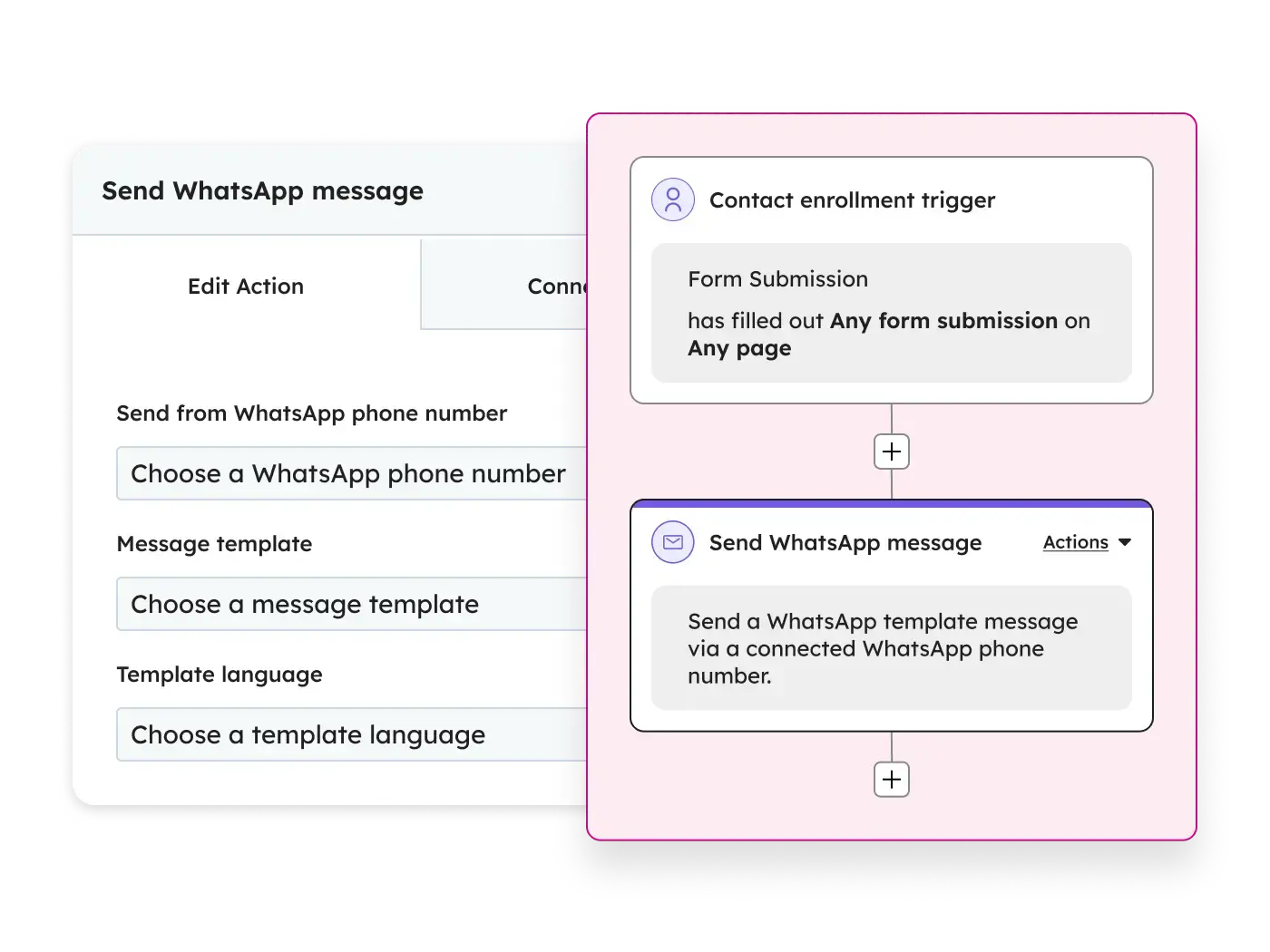
Build sophisticated automation workflows with a visual editor. When a lead downloads an ebook, automatically send a follow-up sequence. When they visit the pricing page, notify sales. When they go quiet for 30 days, re-engage them. All running in the background while you focus on strategy.
- Visual workflow builder with drag-and-drop
- Behavior-based triggers (any action in HubSpot)
- If/then branching for complex logic
- Multi-channel actions (email, ads, internal tasks, CRM updates)
- Goal tracking to measure workflow effectiveness
- Workflow templates for common use cases
Omni-Channel Campaign Management
Plan, execute, and measure campaigns across every channel without jumping between tools. Marketing Studio brings AI-powered campaign planning that helps teams collaborate on content creation and execution.
- Campaign asset organization and tracking
- Marketing calendar for planning
- Cross-channel campaign analytics
- Collaboration tools (tasks, comments, approvals)
- AI-powered campaign planning (Marketing Studio)
Create content that attracts and converts
Publish blog posts, manage SEO, and distribute across social - with AI tools that help you create faster and optimize for both traditional search and AI-powered discovery.
Blog & SEO Tools
Publish SEO-optimized blog content with built-in recommendations. See exactly which keywords you're ranking for, identify gaps, and get actionable suggestions to improve. With AI search changing how people find information, Marketing Hub helps you adapt your strategy.
- Blog editor with SEO recommendations built in
- Keyword tracking and ranking reports
- Google Search Console integration
- Topic clusters for content strategy
- On-page SEO suggestions
- AI search optimization guidance
Social Media Management
Schedule and publish posts to LinkedIn, Facebook, Instagram, and X from one dashboard. Monitor mentions and conversations. Track which posts drive actual traffic and leads - not just vanity engagement.
- Multi-platform scheduling and publishing
- Social inbox for monitoring mentions
- Social analytics connected to CRM
- AI-powered post creation (Breeze Social Agent)
- Instagram DM management
- Best time to post recommendations
Prove marketing's impact on revenue
Go beyond opens and clicks. Understand which campaigns, channels, and content actually drive pipeline and closed revenue - with attribution models that show the complete customer journey.
Marketing Analytics & Dashboards
Build custom dashboards that show the metrics that matter to your business. Track performance across email, ads, social, and web in a unified view that's always connected to your CRM data.
- Custom dashboard builder
- Pre-built marketing reports
- Cross-channel performance views
- Website traffic analytics with source breakdown
- Campaign comparison reporting
- Scheduled report delivery
Revenue Attribution
Multi-touch revenue attribution connects marketing activities to closed deals. See how different campaigns, channels, and content pieces contribute to pipeline and revenue. Choose from multiple attribution models to match your business logic.
- Multi-touch attribution with 7 models (first touch, last touch, linear, U-shaped, W-shaped, time decay, custom)
- Contact create attribution
- Revenue reporting by campaign, channel, and content
- ROI calculation by marketing activity
Ad Tracking & Management
Connect your Facebook, Instagram, LinkedIn, and Google Ads accounts directly to HubSpot.
Instead of just measuring clicks, you can see exactly which ads generate contacts that eventually close as deals.
Use CRM data to target high-intent audiences and turn off ad spend for leads that have already converted.
- Unified ad management console
- ROI reporting based on actual deal revenue
- CRM-powered retargeting audiences
- Automated lead syncing from LinkedIn & Facebook
Lead Scoring
Build scoring models based on fit (company size, industry, job title) and engagement (email opens, page visits, content downloads). Surface leads that are actually likely to buy, not just the ones who download every piece of content you publish.
- Fit scoring based on demographic and firmographic data
- Engagement scoring based on behavior
- Predictive lead scoring powered by AI
- Score-based workflow triggers for automatic routing
- Score decay for leads that go cold
Calls-to-Action (CTAs)
Create embedded and pop-up CTAs that guide visitors toward conversion. Show different offers to different audiences - a demo CTA for high-intent visitors, a guide download for those still researching.
- Smart CTAs that personalize based on viewer data
- CTA performance analytics by placement and audience
- A/B testing to optimize conversion rates
Email Marketing
Design emails that look good on every device with a drag-and-drop editor. Personalize with any CRM data - not just first name, but company, deal stage, past purchases, or custom properties. Send based on behavior triggers, time zones, or AI-optimized send times.
- Drag-and-drop email builder with mobile preview
- Personalization tokens from any CRM field
- AI-powered subject line and content suggestions
- Behavioral triggers (opened email, visited page, filled form)
- Email health reporting to protect deliverability
- A/B testing on subject lines, content, and send times
Marketing Automation Workflows
Build sophisticated automation workflows with a visual editor. When a lead downloads an ebook, automatically send a follow-up sequence. When they visit the pricing page, notify sales. When they go quiet for 30 days, re-engage them. All running in the background while you focus on strategy.
- Visual workflow builder with drag-and-drop
- Behavior-based triggers (any action in HubSpot)
- If/then branching for complex logic
- Multi-channel actions (email, ads, internal tasks, CRM updates)
- Goal tracking to measure workflow effectiveness
- Workflow templates for common use cases
Omni-Channel Campaign Management
Plan, execute, and measure campaigns across every channel without jumping between tools. Marketing Studio brings AI-powered campaign planning that helps teams collaborate on content creation and execution.
- Campaign asset organization and tracking
- Marketing calendar for planning
- Cross-channel campaign analytics
- Collaboration tools (tasks, comments, approvals)
- AI-powered campaign planning (Marketing Studio)
Blog & SEO Tools
Publish SEO-optimized blog content with built-in recommendations. See exactly which keywords you're ranking for, identify gaps, and get actionable suggestions to improve. With AI search changing how people find information, Marketing Hub helps you adapt your strategy.
- Blog editor with SEO recommendations built in
- Keyword tracking and ranking reports
- Google Search Console integration
- Topic clusters for content strategy
- On-page SEO suggestions
- AI search optimization guidance
Social Media Management
Schedule and publish posts to LinkedIn, Facebook, Instagram, and X from one dashboard. Monitor mentions and conversations. Track which posts drive actual traffic and leads - not just vanity engagement.
- Multi-platform scheduling and publishing
- Social inbox for monitoring mentions
- Social analytics connected to CRM
- AI-powered post creation (Breeze Social Agent)
- Instagram DM management
- Best time to post recommendations
Marketing Analytics & Dashboards
Build custom dashboards that show the metrics that matter to your business. Track performance across email, ads, social, and web in a unified view that's always connected to your CRM data.
- Custom dashboard builder
- Pre-built marketing reports
- Cross-channel performance views
- Website traffic analytics with source breakdown
- Campaign comparison reporting
- Scheduled report delivery
Revenue Attribution
Multi-touch revenue attribution connects marketing activities to closed deals. See how different campaigns, channels, and content pieces contribute to pipeline and revenue. Choose from multiple attribution models to match your business logic.
- Multi-touch attribution with 7 models (first touch, last touch, linear, U-shaped, W-shaped, time decay, custom)
- Contact create attribution
- Revenue reporting by campaign, channel, and content
- ROI calculation by marketing activity
AI that multiplies your marketing team
Breeze is HubSpot's AI - built into every part of Marketing Hub. It's not a bolt-on feature or a separate tool. It's woven into the workflows you already use, helping you move faster without sacrificing quality.
Breeze Content Agent
Generate blog posts, landing page copy, and email content based on your brand voice. The AI learns from your existing content and suggests new pieces that match your style. Use it as a first draft or a brainstorming partner.
Breeze Social Agent
Create platform-optimized social posts without staring at a blank screen. Get recommendations for content mix, timing, and hashtags based on what performs in your industry.
AI Email Writer
Write subject lines, body copy, and CTAs faster. Test multiple variations automatically and let the data decide which version wins.
AI-Powered Optimization
Get recommendations for send times, content improvements, and campaign optimization based on your historical data. The more you use Marketing Hub, the smarter the suggestions get.
Form Shortening
Breeze Intelligence can dynamically shorten your forms while still capturing the data you need. It fills in known information from HubSpot's database, so visitors complete forms faster and you still get complete lead profiles.
Marketing that's connected to sales and service
Marketing Hub is powerful on its own. But the real value comes when marketing, sales, and service share the same customer data. No more silos. No more "let me check with the other team." Everyone sees the same truth.
Marketing + Sales
Lead handoff that actually works.
Sales sees every email open, page view, form submission, and content download right on the contact record. Marketing sees which leads convert to opportunities and which deals close. Closed-loop reporting shows marketing's true impact on revenue - not just lead volume.
When a lead hits a certain score, sales gets notified automatically. When a deal closes, marketing knows which campaigns influenced it. The finger-pointing stops.
Marketing + Service
Turn customers into advocates.
Identify satisfied customers for case studies, reviews, and referral programs. Spot at-risk accounts before they churn. Create expansion campaigns based on usage data and customer health scores.
The customer journey doesn't end at the sale. Marketing Hub helps you nurture customers into promoters.
Marketing + Smart CRM
Every activity tied to a unified record.
Every marketing touch is connected to a single customer record. Segment based on any CRM data - deal stage, company size, product interest, custom properties. Personalize based on the full picture, not just email behavior.
Your marketing gets smarter as your CRM gets richer.
Transparent pricing that scales with your contacts
Marketing Hub pricing is based on two things: the features you need and the number of marketing contacts in your database. Non-marketing contacts (people you're just tracking, not actively emailing) are free.
Free Tools
What you get:
- Basic CRM and limited features of each Hub
Best for:
Very small teams testing HubSpot, or companies with minimal needs
Investment / Limitations:
Limited contacts, limited features, no automation, HubSpot branding on forms and emails
Key Insight: HubSpot's free CRM is genuinely useful—not just a trial. Many companies use it for years before upgrading.
Starter
What you get:
- Core features, removes HubSpot branding, basic automation
Best for:
Small businesses getting started with structured marketing and sales
Investment / Limitations:
Starting at $20/month per seat for most Hubs
Key Insight: Starter is a significant upgrade from Free, but lacks the automation and advanced features that growing companies usually need.
Professional
What you get:
- Full automation, advanced features, custom reporting, integrations
Best for:
Growing companies ready to scale their operations
Investment / Limitations:
Marketing Hub Professional starts at $890/month, Sales Hub Professional at $100/month per seat
Key Insight: Professional is where most B2B companies see real ROI. This tier unlocks workflows, sequences, custom reports, and the features that actually transform how you work.
Enterprise
What you get:
- Advanced permissions, custom objects, hierarchical teams, advanced analytics, sandboxes
Best for:
Larger organizations with complex needs
Investment / Limitations:
Marketing Hub Enterprise starts at $3,600/month, Sales Hub Enterprise at $150/month per seat
Key Insight: Enterprise isn't just "more of Professional"—it unlocks features that only make sense for larger, more complex organizations.
PRICING NOTE
Prices shown are approximate and depend on your specific configuration. Marketing Hub pricing scales with your contact database - you only pay for contacts you're actively marketing to. We'll help you model the right tier without overselling.
We don't just set up Marketing Hub. We make it drive results.
Marketing automation platforms are powerful - when they're set up correctly. Too many companies buy Marketing Hub and end up using 20% of it. Forms work. Basic emails go out. But the automation, the attribution, the real value? Never gets built.
We're here to make sure that doesn't happen.
HubSpot Platinum Partner
We've implemented Marketing Hub for dozens of B2B companies across industries. We know which features matter for your business, which ones to skip, and how to avoid the common mistakes that waste time and budget.
Strategy First, Tools Second
Before we touch the software, we understand your marketing process. Who are you targeting? What's your customer journey? Where do leads come from today? Technology serves strategy - not the other way around. We build Marketing Hub around how you actually work.
Ongoing Optimization
Implementation is just the beginning. Marketing automation isn't "set it and forget it." We help you analyze performance, test new approaches, and optimize campaigns over time. Your marketing should get better every quarter - not just in month one.
Marketing Hub has hundreds of features. Workflows with dozens of options. Integrations with everything. It can feel overwhelming. We've done this many times before - we'll guide you through it step by step.
What marketing teams say after implementing with Buldok
"We had Mailchimp for email, Hootsuite for social, and Google Ads running separately. Six months after implementing Marketing Hub with Buldok, we can finally see which campaigns actually drive pipeline — not just clicks and opens."
"The implementation was faster than we expected — we were running automated nurture campaigns within 4 weeks. But what really made the difference was having a partner who understood our B2B sales process."
Frequently Asked Questions About HubSpot
Marketing Hub is a full marketing automation platform, not just email software. It includes landing pages, forms, social media management, SEO tools, ads management, and attribution reporting - all connected to your CRM.
With Mailchimp, you see email metrics. With Marketing Hub, you see the complete customer journey from first website visit to closed deal. That's a fundamentally different level of insight.
Marketing Hub works great on its own. But the real power emerges when marketing and sales share the same data.
Even with just the free HubSpot CRM, your sales team will see all marketing activity on contact records - every email opened, page visited, and form submitted. If you add Sales Hub, you get full closed-loop reporting: which marketing campaigns generated which deals, and how much revenue.
You pay for the number of marketing contacts - people you're actively emailing or targeting with ads. Contacts that just exist in your CRM (customers you're tracking, old leads you're not actively marketing to) are free.
This means you don't pay for your entire database. You can have 100,000 contacts in HubSpot but only pay for the 5,000 you're actively marketing to. You control who counts as a marketing contact.
Basic setup (forms, email, simple automation) takes 2-4 weeks. Full implementation with lead scoring, complex workflows, integrations, and custom reporting typically takes 6-8 weeks. Large migrations from other platforms may take 2-3 months.
We always work with a clear project plan and defined milestones. No open-ended implementations.
Yes. We handle migrations from other platforms regularly. We'll export your contacts and historical data, clean up duplicates and formatting issues, rebuild your templates in HubSpot's editor, and recreate your automation workflows.
You won't lose your historical engagement data, and you'll usually gain functionality in the process.
This is more common than you'd think. Many companies buy HubSpot, set up the basics, but never unlock the real value - the automation, the attribution, the optimization.
We offer Marketing Hub audit and optimization packages. We'll review your current setup, identify what's missing or misconfigured, and build out the capabilities you're not using. Often, the potential is already there - it just needs someone to unlock it.
Yes - it's one of the most popular marketing automation platforms for B2B. The CRM integration, lead scoring, account-based marketing (ABM) features, and long-form nurture workflows are specifically designed for B2B sales cycles.
Most of our clients are B2B companies with 20+ employees and sales cycles longer than a quick purchase. Marketing Hub handles that complexity well.
HubSpot is actively addressing this. Marketing Hub includes tools to help you understand how AI search (ChatGPT, Perplexity, Google AI Overviews) affects your traffic and adapt your strategy.
The reality is that AI search captures some top-of-funnel traffic - but the visitors who do reach your site have higher intent. Marketing Hub helps you convert those higher-intent visitors with personalized experiences and clear attribution.
Ready to stop guessing and start growing?
The best marketing automation is the one your team actually uses - and the one that actually proves its impact on revenue. Let's talk about how Marketing Hub can work for your business.